
Cohorts explained: how dynamic user groups level up your analytics strategy
A cohort is not a static list you curate. It is a set of rules that evaluate user data continuously, so the group updates itself as behavior changes.


What exactly is a cohort?
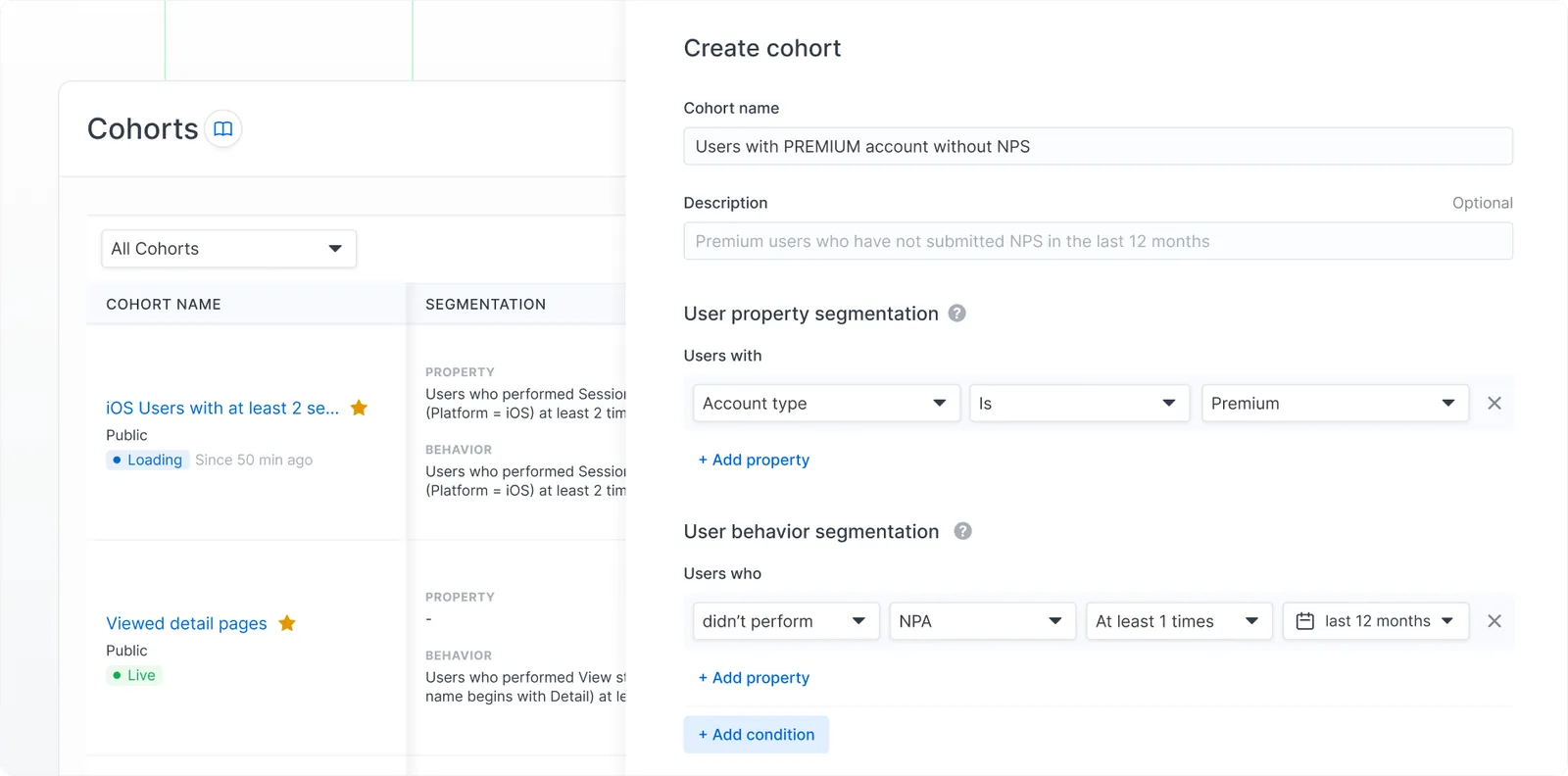
At its core, a cohort is a group of users who share common traits or behaviors over a specific period. But here is the key: it is not a static list you manually curate. Think of it instead as a set of dynamic rules that automatically evaluate user data to determine who belongs in the group.
You might create a cohort of users who made their first purchase within the last 30 days, or active app users in the past week. As behavior changes (someone stops engaging, or completes a new action), the system re-evaluates and updates the group in real time. Unlike traditional segmentation, which relies on fixed demographics like age or location, cohorts focus on actions and timelines, revealing patterns that static groups miss.
How cohorts work
Cohorts operate by continuously checking user data against predefined conditions. When new data arrives (a session start, an event like a purchase, a property update), the system assesses whether a user meets the criteria.
Real-time and non-real-time cohorts
- Real-time cohorts update instantly as new data arrives. If a user performs an action that qualifies or disqualifies them, they are added or removed on the spot. A daily background check handles time-based expirations, like inactivity over seven days.
- Non-real-time cohorts, the legacy option, update only during a scheduled daily job, recalculating the entire group from scratch. Reliable, but more resource-intensive and less immediate.
In Countly you can switch between modes in settings, but real-time is the default.
Entering, staying and exiting
- Entering: users join when they match the conditions, even if the qualifying action happened before the cohort was created. Countly scans historical data retroactively, so you get a complete picture from day one.
- Staying: as long as the conditions hold, users remain. The system re-evaluates on every data update or edit to the rules.
- Exiting: if behavior shifts, a user is removed automatically. Time-based exits, like falling outside a seven-day activity window, are checked daily.
The benefits
- Deeper insight: track how specific groups behave over time, uncovering retention drops or engagement spikes.
- Automated efficiency: no manual list-building; cohorts update themselves, saving time and reducing errors.
- Targeted strategies: use cohorts for personalized messaging, A/B testing or feature rollouts based on real behavior.
- Flexibility: e-commerce, gaming or SaaS, cohorts adapt from simple event-based groups to complex time-sensitive ones.
Practical scenarios
- Retention analysis: create a cohort of users who installed in a specific week, then monitor their activity over months to identify drop-off points and improve onboarding.
- Behavioral targeting: for an e-commerce site, define a cohort of users who viewed products but did not purchase in the last seven days, and send them a targeted offer.
- Engagement tracking: in a mobile game, group active players from the last 30 days and analyze session lengths to refine features.
Real-world use cases
Crash impact mitigation
The cohort: users who experienced a fatal crash or severe error in the past seven days. The action: cross-reference with your retention dashboard to measure the exact impact bugs have on churn, and target the cohort with an in-app message that acknowledges the problem, preserving trust after a bad experience.
Power user nurturing
The cohort: highly engaged users who log in more than five times a week and have completed a key conversion event. The action: use ratings and feedback tools on this cohort only. They are your most successful users, so they are the best audience to ask for a review or to invite to beta-test a new feature.
Validating feature adoption
The cohort: users who have interacted with a newly launched feature at least once. The action: apply the cohort as a segment in Drill and Retention, and compare average session duration and long-term retention against users who have not touched the feature.
Hyper-local geofencing
The cohort: users with the loyalty app installed who physically enter a predefined area (say a 500-meter radius around your flagship store) between noon and 5pm. The action: because location data and cohort grouping are handled in real time, you can trigger a push notification the moment they cross the geofence, and turn passing footfall into a visit.
Wrapping up
Cohorts are not just a feature. They are a strategic essential for anyone serious about user data. By grouping users dynamically on behavior, you get insight that static methods cannot match, with real-time updates and historical evaluation, so the data is both timely and complete.